
Before I founded CasinoCurrencies.com, I spent years analyzing corporate payment flows. I learned how secure systems should function, but I also learned that no system is entirely immune to sophisticated social engineering and fraud. As an iGaming payment expert in 2026, I constantly see emerging eZeeWallet scams targeting the unsuspecting.
While eZeeWallet security features are strong—backed by FCA regulation and strict ISO audits—attackers don't usually try to 'hack' the platform's actual servers. They try to hack you.
I am writing this guide for Canadian iGaming players. Whether you’re a high-stakes bettor or casual player, protecting your hard-earned CAD against eZeeWallet fraud is critical. You must treat your e-wallet with the same vigilance as your bank account. Let’s break down how to secure your funds from attackers.
What Does Common eZeeWallet Fraud and Phishing Look Like?
To stop an attacker, you must know their tactics. Here are the most common methods fraud operators use to steal CAD from eZeeWallet users.
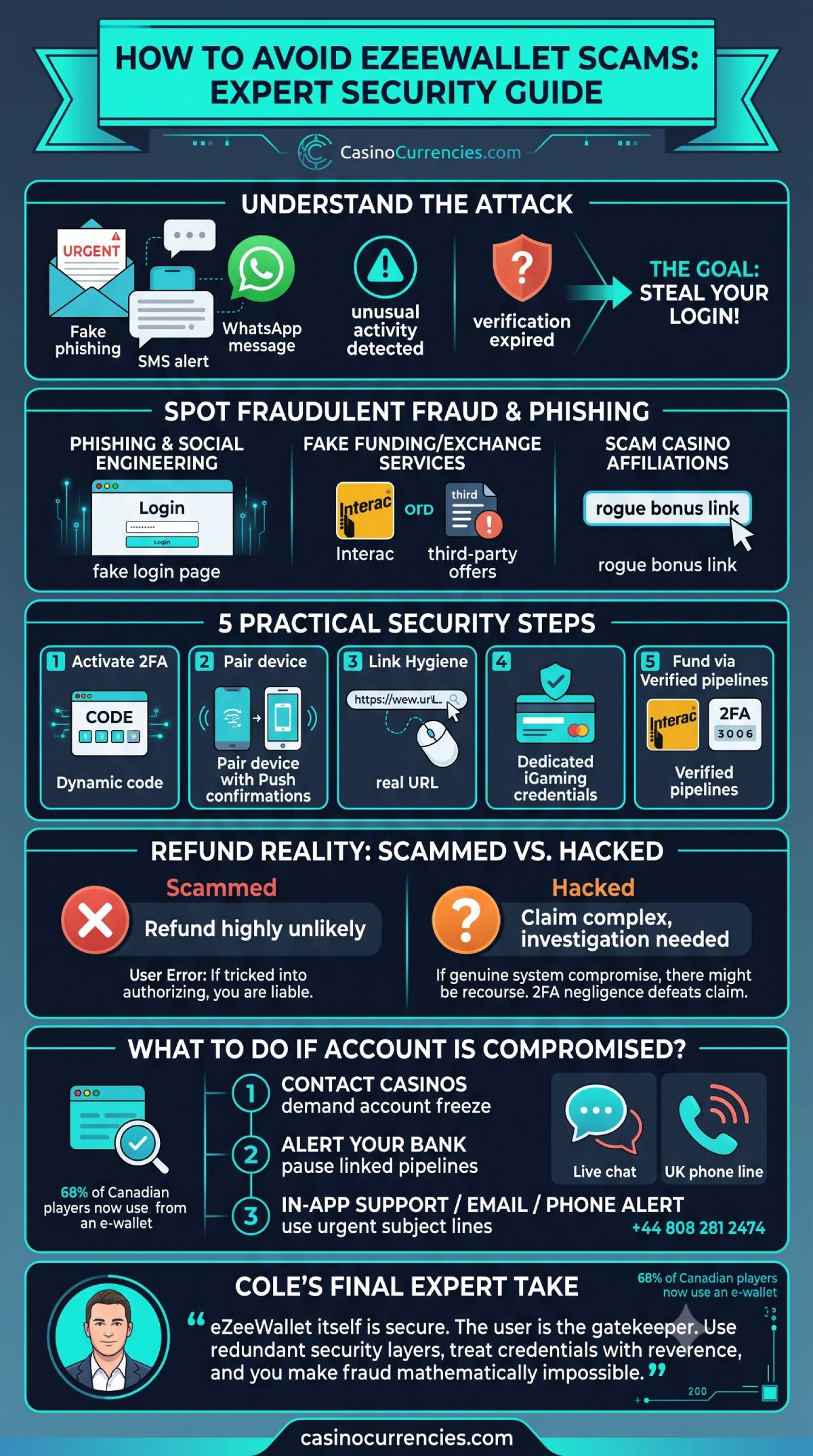
The Phishing and Social Engineering Attack
The most common method is not a technical hack, but social engineering. You receive an email, SMS, or even a WhatsApp message that appears to be from eZeeWallet security support.
These messages always create artificial urgency. Common hooks include:
- "Unusual activity detected on your account."
- "Your verification documents have expired; re-upload now or your funds will be frozen."
- "You have received a bonus transfer; click here to claim."
These messages contain links to a perfect replica of the eZeeWallet login page. If you enter your email and password, the attackers immediately use those credentials to drain your balance.
Fake "Priority Loading" or Exchange Services
Attackers know that funding e-wallets sometimes involves friction or higher fees (like the 4.5% fee on Interac e-Transfer funding). They exploit this by creating fake websites or social media groups offering "Instant eZeeWallet Funding—0% Fees" or "CAD to Crypto: Best Exchange Rates."
They ask you to transfer money to them (often via Interac or crypto), promising to load your eZeeWallet balance. Once they receive your money, they vanish. eZeeWallet explicitly warns against using these unauthorized third-party services.
Scam Casino Affiliations and Bonuses
Always be cautious of sites or emails promising "eZeeWallet Exclusive Bonuses" that require you to create an account through a specific, non-verified link. Some fraudulent operations use this tactic to collect user data, while others promote rogue casinos that accept eZeeWallet deposits but make it mathematically impossible for you to withdraw.
5 Practical Steps to Secure Your CAD Balance Against eZeeWallet Scams
As a payment systems expert, I don’t rely on luck. I rely on redundant security layers. If you implement these five protocol steps, you will make it exponentially harder for eZeeWallet scams to succeed.
1. Mandatory Activation of Two-Factor Authentication (2FA)
If you ignore everything else in this guide, do this: activate Two-Factor Authentication (2FA). This single action eliminates roughly 98% of standard automated attacks.
With 2FA, even if an attacker steals your login email and password (via phishing), they still cannot access your eZeeWallet account without the second, dynamic code. You should use a 2FA app (like Google Authenticator or Authy) rather than SMS codes, as these are safer against SIM-swapping.
2. Verify Every Transaction with 'Push' Confirmations
Enable mobile push notifications for the eZeeWallet app.
Modern authentication flows are designed around 'Push' confirmations. When you make an eZeeWallet casino deposit, you don't just input a code; you should receive a push notification on your paired device. If you see a notification on your phone asking you to authorize a CAD withdrawal or a deposit you did not initiate, you immediately know you have been targeted.
3. Rigorous Link Hygiene: The 'Hover' Technique
This is fundamental internet literacy, yet it stops the vast majority of phishing attempts.
If you receive an email or SMS with a link, never click it immediately. On a desktop, hover your mouse over the button or link. A small box will appear (usually in the bottom-left corner) showing the actual destination URL. If you are expecting ezeewallet[dot]com but see ezee-security-verif[dot]net, do not click. If you are on mobile, use a browser to navigate to the official login page rather than using the link.
4. Use Dedicated Credentials and Segmented Funds
When configuring any e-wallet, I always recommend credential segmentation. Do not use the same password for eZeeWallet that you use for your casino account or your primary email. Better yet, create a dedicated email address specifically for all your iGaming-related banking.
This limits damage: if your casino account is compromised, the attackers cannot automatically use those details to access your eZeeWallet funds.
5. Only Fund Your Account via Verified Pipelines
I established this on my site's main guide: eZeeWallet supports Interac e-Transfer for Canadian users. This is a verified, secure pipeline that uses bank-grade authentication.
Never, under any circumstances, fund your wallet through an unauthorized, P2P exchange or a third-party payment service offering 'zero fees' outside the eZeeWallet cashier. The security of e-wallets relies entirely on managing funds through integrated, verified partners.
Does eZeeWallet Refund Money If You Are Scammed?
This is the question I am asked most frequently: "If someone scams me, will eZeeWallet give me a refund?"
The honest, expert answer is: No, they almost certainly will not.
Here is the inconvenient truth about e-wallet chargebacks. Traditional e-wallets (like eZeeWallet, Skrill, and Neteller) function mathematically closer to cash than credit cards. Their infrastructure is designed for instant, immutable transfers.
The Strict Non-Refundable Nature of E-Wallets
Because e-wallet transactions are immutable (unchangeable), once money moves, it is considered complete. It is very different from a credit card, where you can dispute a charge months later.
This strict policy is because e-wallets, despite having an institutional backbone (the parent company, emerchantpay Ltd, has moved money since 2002), cannot reverse a transaction if you authorized it—even if you were tricked into doing so.
Critical Distinction: Authorized vs. Unauthorized:
- Scammed (You authorized the transaction): If you send CAD to a fake exchange or deposit at a rogue casino, you technically initialized and authorized that transaction. From eZeeWallet's perspective, the funds were moved correctly according to your instruction. They cannot and will not refund this.
- Hacked (Account takeover): This is the only theoretical scenario for a claim, and even then, it is highly complex. If someone bypassed your security layers (due to a failure of eZeeWallet security, which is highly unlikely), they might investigate. However, if they find that you were scammed into giving up your 2FA code or did not have 2FA activated, they will argue you were negligent. They are regulated as an Electronic Money Institution (EMI) under the FCA (UK Financial Conduct Authority), which requires them to safeguard user funds, but this does not protect against user error.
If you are scammed, your best option is to report the rogue platform to iGaming watchdogs and legal authorities. Do not rely on eZeeWallet support to act as a police force.
What to Do If Your Account Is Hacked or Compromised?
If you see an authorization notification you did not request, or if you cannot log in despite entering the correct details, you must act with extreme speed.
Phase 1: Lock Down the Pipelines
If you have even 1% suspicion your account has been breached:
- Immediate Casino Communication: Do not start with eZeeWallet support. Start with the casinos where you play. Use their live chat or support email (write [at] instead of @ in emails, like security[at]888[dot]com). Demand that they immediately freeze your casino account and pause all pending eZeeWallet withdrawals.
- Contact Your Bank: If your eZeeWallet account is linked to your Interac or credit card for automated top-ups, contact your Canadian bank immediately to pause those linked payment channels. Prevent the wallet from drawing more CAD.
Phase 2: Alert eZeeWallet
Once you have secured your peripheral accounts, you must notify the platform itself.
Access the In-App Support Feature
If you can still access the app, look for the in-app support function. This is often the fastest route for high-priority security concerns. Detail the specific issue: "I believe my account has been compromised. Unauthorized login attempt detected."
Email and Phone Support Protocols
For critical security alerts, redundantly contact them via their published channels:
- Email Support: Send an urgent message to security[at]ezeewallet[dot]com. Use the exact subject line: URGENT SECURITY ALERT: ACCOUNT COMPROMISED (Account Email: [Your Email]). This must go through the standard verification queue, but it is necessary.
- Phone Support: If the scenario is time-sensitive, call their dedicated line: +44 808 281 2474. (Note that this is a UK-based number, so be aware of time zone differences when calling from Canada).
If your funds are already gone, do not delete the account. You need the transaction logs for any potential police report. Follow the mandatory verification requirements requested by their support team as part of their investigation.
Final Verdict
My expert final thought is that eZeeWallet is inherently secure, but you are the gatekeeper. Treat your account credentials with absolute reverence, use 2FA without exception, and you will effectively isolate your CAD balance from eZeeWallet scams.