
If you are going to trust a digital wallet with your real money, you deserve to know exactly what you are dealing with - who built it, what it costs, and where the guardrails are. I have used Skrill professionally for years and dissected its fee structures, regulatory filings, and corporate history more times than I care to admit. This guide covers every question Canadian players ask me about this e-wallet, from funding an account to buying Bitcoin inside it.
Let us get into it.
Who Owns Skrill and Who Started It?
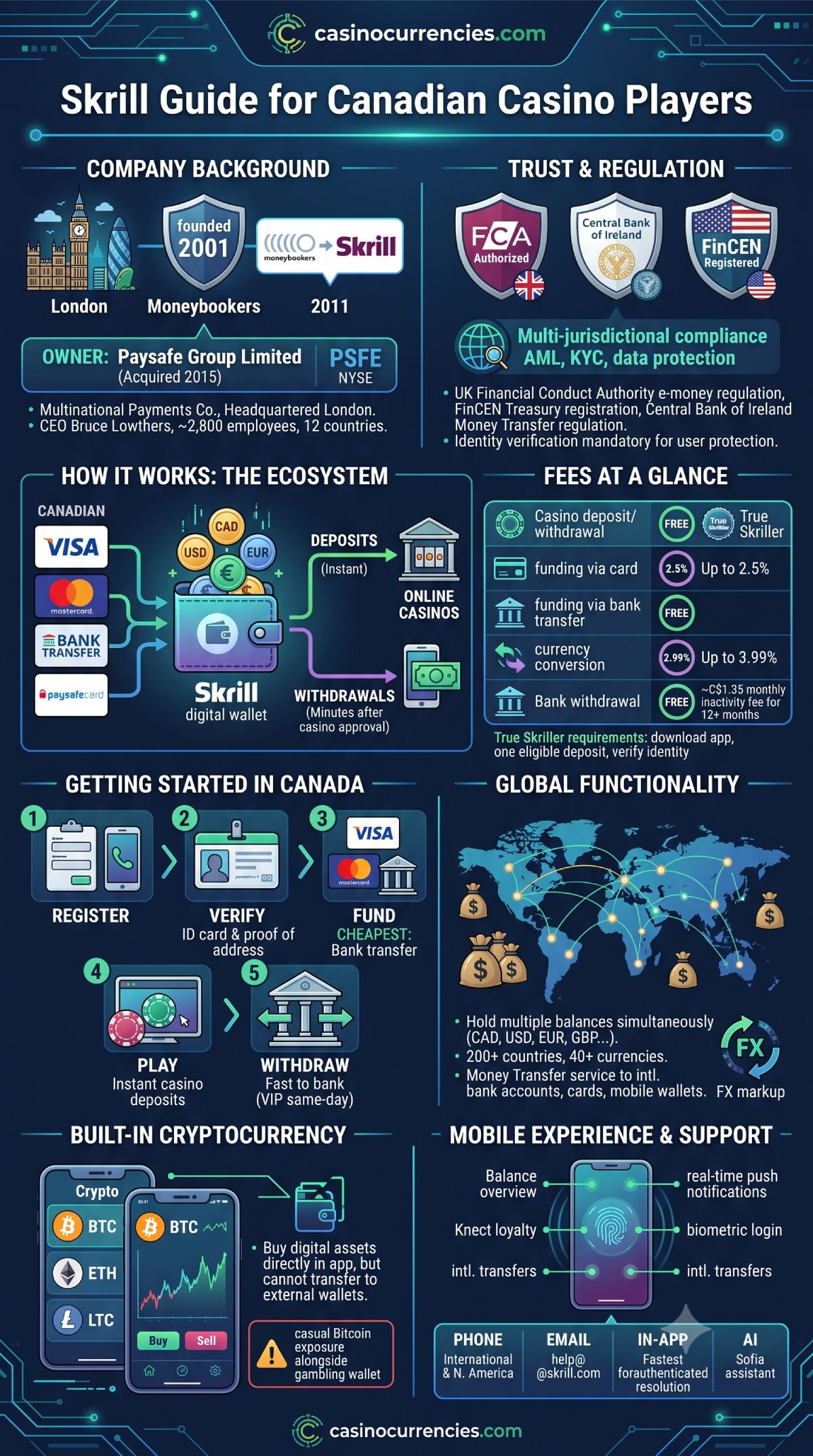
Skrill was founded in 2001 in London under the original name Moneybookers. The company was created as a general-purpose online payment service at a time when PayPal was still finding its footing outside of eBay. After a decade of growth and roughly 25 million registered users, Moneybookers rebranded to Skrill in 2011.
The pivotal ownership shift came in 2015 when Paysafe Group acquired the e-wallet for approximately €1.1 billion. Paysafe, a multinational payments company headquartered in London, also owns Neteller and Paysafecard. Today, Skrill operates as a subsidiary of Paysafe Limited, which is publicly traded on the New York Stock Exchange under the ticker PSFE. Bruce Lowthers currently serves as Paysafe's CEO, overseeing a workforce of approximately 2,800 employees across 12 countries.
The platform now supports over 40 million registered users in more than 200 countries and processes transactions for upwards of 120,000 merchants globally.
Does Skrill Charge Fees?
Yes - and understanding the fee schedule is critical before you start moving money. The good news for Canadian casino players is that depositing into and withdrawing from online casinos through Skrill is free on both ends. The fees appear elsewhere in the transaction chain.
| Transaction Type | Fee |
|---|---|
| Casino deposit | Free |
| Casino withdrawal to Skrill wallet | Free |
| Funding via bank transfer | Free |
| Funding via credit or debit card | Up to 2.5% |
| Skrill-to-Skrill transfer (same currency) | Free for True Skriller accounts |
| Withdrawal to bank account | 7.5% (waived at True Skriller status) |
| Currency conversion | Up to 3.99% |
| Inactivity (12+ months no activity) | ~C$1.35/month |
That 7.5% bank withdrawal fee is the one that surprises most new users. However, achieving "True Skriller" status - which only requires downloading the app, making one eligible deposit, and completing identity verification - waives this charge entirely. I always recommend Canadians verify their account immediately after registration for this reason alone.
How to Fund a Skrill Account in Canada
Setting up and funding your account is straightforward. Here is the step-by-step process I walk every reader through:
- Visit skrill.com or download the mobile app from the Apple App Store or Google Play Store
- Register with your email address and create a strong, unique password
- Complete identity verification by uploading a government-issued photo ID and proof of address
- Navigate to the "Deposit" section of your account dashboard
- Select your preferred funding method
- Enter the amount you wish to add and confirm the transaction
Funding methods available to Canadian users include:
- Visa or Mastercard debit cards
- Visa or Mastercard credit cards
- Bank transfer (the cheapest option)
- Paysafecard vouchers
- Other local payment methods depending on your region
Bank transfers arrive fee-free but may take one to three business days to clear. Card deposits process instantly but carry the 2.5% fee. For regular casino players, I recommend establishing a bank transfer as your primary funding route and keeping card deposits as a backup for time-sensitive situations.
How to Withdraw From Skrill
Pulling money out of your e-wallet to your Canadian bank account requires just a few steps:
- Log into your Skrill account via the app or website
- Go to the "Withdraw" section
- Select your bank account (you will need to add it the first time using your banking details)
- Enter the withdrawal amount
- Confirm and wait for processing
Standard bank withdrawals take one to three business days. First-time withdrawals may take up to 15 business days due to additional security verification. The 7.5% fee applies unless you hold True Skriller or VIP status. You can also withdraw to a Visa or Mastercard at a fee of approximately 3.49%.
Does Skrill Work Internationally?
Absolutely - international functionality is one of the platform's core strengths. The e-wallet operates in over 200 countries and supports more than 40 currencies. Canadian users can hold CAD alongside USD, EUR, GBP, AUD, and dozens of other currencies simultaneously within a single account.
For online casino players, this means you can deposit at gambling sites denominated in different currencies without needing separate accounts. The platform handles the conversion internally, though the 3.99% FX markup applies whenever you move money between currencies.
Skrill's Money Transfer service also allows you to send funds to international bank accounts, Visa or Mastercard cards, and mobile wallets in dozens of countries. Transfer fees are zero when funded by bank transfer, and delivery times range from a few minutes to 72 hours depending on the destination.
Is Skrill Publicly Traded? What About Revenue?
Skrill itself is not independently traded, but its parent company Paysafe Limited is listed on the NYSE under ticker PSFE. This gives investors and users alike a window into the financial health of the organization behind the e-wallet.
Key financial figures from Paysafe's public filings:
- 2025 full-year revenue: US$1.70 billion
- 2025 annualized transaction volume: approximately US$167 billion
- Q1 2026 revenue: US$442.7 million (10% year-over-year growth)
- 2026 revenue guidance: US$1.79-1.83 billion
- Market capitalization (mid-2026): approximately US$463 million
The company's Digital Wallets segment, which includes both Skrill and Neteller, showed 6% organic growth in Q4 2025, driven largely by North American iGaming demand. For Canadian players, this financial transparency is reassuring - you are entrusting your funds to a company that must answer to shareholders, regulators, and the SEC simultaneously.
Does Skrill Report to Financial Regulators?
Yes, and this is something I consider non-negotiable when recommending any payment platform. The UK Financial Conduct Authority authorizes Skrill Limited under the Electronic Money Regulations 2011. The company is registered in England and Wales under Company No. 4260907, with its registered office at Floor 27, 25 Canada Square, London, E14 5LQ.
For its Money Transfer services specifically, the platform is regulated by the Central Bank of Ireland through Paysafe Payment Solutions Limited. In the United States, Paysafe is registered with the Financial Crimes Enforcement Network (FinCEN) under the US Treasury.
This multi-jurisdictional regulatory framework means Skrill must comply with anti-money laundering requirements, Know Your Customer verification procedures, and data protection standards across every market it operates in. For Canadian users, this translates to mandatory identity verification before you can use the wallet fully, which is an inconvenience that exists entirely for your protection.
Can You Buy Crypto With Skrill?
Yes. The e-wallet offers a built-in cryptocurrency section where users in supported regions can buy and sell digital assets directly within the app. The platform supports Bitcoin, Ethereum, Litecoin, and a growing selection of altcoins.
How to buy Bitcoin through Skrill:
- Log into your account via the app or website
- Navigate to the "Crypto" tab on your dashboard
- Select "Buy" and choose Bitcoin from the asset list
- Enter the amount you want to purchase in CAD or your preferred currency
- Review the exchange rate and fees displayed on the transaction summary
- Confirm the purchase
The platform supports instant buy orders, limit orders, recurring purchases, and customizable price alerts. You can also send purchased crypto to other Skrill users. However, one significant limitation exists: you cannot transfer cryptocurrency to an external wallet address. Your crypto remains within the Skrill ecosystem, which means you do not hold the private keys.
For serious crypto investors, I recommend using a dedicated exchange instead. For Canadian casino players who want casual Bitcoin exposure alongside their gambling wallet, the built-in feature is convenient enough.
How to Contact Skrill Support
Reaching a human at any fintech company can be frustrating. Here are your options for Skrill:
| Contact Method | Details |
|---|---|
| Phone (North America) | +1 855-719-2087, Monday-Friday, 9 AM-7 PM EST |
| Phone (International) | +44 (0) 203 514 5562 |
| help[at]skrill.com | |
| In-app support | Log in and submit a support case directly |
| AI assistant | "Sofia" chatbot available on the support page |
| VIP email | vip[at]skrill.com (VIP account holders only) |
| Social media | Twitter and Facebook (do not share account details publicly) |
From personal experience, the in-app support case route delivers the fastest resolution because your account is already authenticated. Phone hold times average around four minutes according to aggregated user data, though this varies by day.
What Currencies and Payment Methods Are Available?
The digital wallet supports over 40 currencies. The most commonly used by Canadian players include CAD, USD, EUR, and GBP. You can hold multiple currency balances simultaneously and convert between them within the app.
Accepted deposit methods vary by region but include:
- Visa and Mastercard (credit and debit)
- Bank transfers (standard and rapid)
- Paysafecard and PaysafeCash vouchers
- Neteller transfers
- Local payment methods specific to your country
- Apple Pay and Google Pay (select regions)
How Long Do Skrill Transactions Take?
Transaction speed depends on the type of transfer:
- Casino deposits: Instant
- Casino withdrawals to Skrill: Minutes after operator approval (which itself takes 12-48 hours at most casinos)
- Card funding: Instant
- Bank transfer funding: 1-3 business days
- Withdrawal to bank: 1-3 business days (same-day from Gold VIP tier and above)
- Skrill-to-Skrill transfers: Instant
- International money transfers: Minutes to 72 hours depending on destination
Can a Skrill Payment Be Reversed?
This depends on the transaction type. Skrill-to-Skrill transfers are final and irreversible once processed. If you send money to the wrong person, your only recourse is contacting the recipient directly.
For card-funded transactions, you have the right to initiate a chargeback through your bank in cases of unauthorized transactions or undelivered goods and services. Skrill's terms state that refund requests for merchant payments must go through the merchant directly - the e-wallet processes refunds only when instructed to do so by the merchant.
Chargebacks must generally be filed within six months of the transaction date. Card refunds take up to seven days to process once approved.
How to Cancel a Skrill Payment
If a transaction is still pending, you may be able to cancel it through your account dashboard. Once a payment has been fully processed, cancellation is not possible through the platform.
For merchant payments where you need a refund, contact the merchant first. If the merchant refuses, you can escalate by submitting a support case through your Skrill account or by filing a chargeback with your card issuer for card-funded transactions.
My advice: always double-check recipient details and transaction amounts before confirming. The finality of processed payments is one of the trade-offs of using any e-wallet, and prevention is far easier than resolution.
The Skrill Mobile App
The app is available on both iOS (requires iOS 15.0 or later) and Android through the Apple App Store and Google Play Store, respectively. It supports 11 languages, including English and French - both of which matter for Canadian users.
Core app features include:
- Full account management with balance overview and transaction history
- Biometric login via fingerprint or face recognition
- Two-factor authentication
- Real-time push notifications for every transaction
- Cryptocurrency buying, selling, and price alerts
- International money transfers
- Knect loyalty program tracking and rewards
- Instant card freeze functionality
- Prepaid card management (where available)
The interface is clean and functional. It mirrors the desktop experience closely, so anything you can do on skrill.com, you can do on your phone. For Canadian casino players who want to manage deposits and withdrawals on the go, the app is essentially mandatory - I would not recommend using the platform without it.